How to reconcile a vendor statement in QuickBooks Online (step by step)
A practical way to reconcile a vendor's statement against QuickBooks Online - which reports to run, how to match the invoices, and how to explain every difference down to the cent.
A vendor statement lists every invoice, credit and payment the vendor believes is still open on your account. Reconciling it means comparing that list with your own accounts payable and explaining every difference - so you don't pay an invoice twice, miss one that's about to go overdue, or argue about a payment the vendor never applied.
QuickBooks Online reconciles bank and credit card accounts, but it has no built-in way to reconcile a vendor's statement. Here's how to do it with two standard reports.
What you need
- The vendor's statement, ideally as Excel or CSV. Ask for an open items statement (only what's still unpaid) rather than an activity statement.
- The A/P Aging Detail report from QuickBooks Online: your open bills, credits and unapplied payments.
- Optional: the Transaction List by Vendor for all dates - every bill and credit you ever entered for the vendor. You need it to tell an invoice you already paid from one you never entered.
Step 1: Run the A/P Aging Detail as of the statement date
In QuickBooks Online, open Reports and search for A/P Aging Detail. Set the date to the statement's date: if the vendor's statement is dated September 30, run your aging as of September 30 too. Comparing two different dates creates differences that are only timing.
Run the report and choose Export → Export to Excel. If several of your QuickBooks Online companies buy from the same vendor, export one report per company.
Step 2: Compare the two balances first
Before looking at single lines, compare the totals:
| Amount | |
|---|---|
| Balance per vendor statement | 3,065.35 |
| Balance per your books (this vendor's lines in the A/P Aging Detail) | 2,454.60 |
| Difference to explain | 610.75 |
The numbers come from a made-up example vendor, Northwind Brake Supply. The goal of the reconciliation is to explain that 610.75 completely, with nothing left over.
Step 3: Match the lines
Go down the statement and find each invoice in your aging by its number. Expect three kinds of trouble:
- The same invoice written differently. The vendor prints
INV-0051200490; your bill says51200490. Same document. - Typos. One digit off -
51200555on the statement,51200565in your books - usually with the same amount. - Payments under another number. The vendor lists your payment as
PMT-0915; in your books it's checkCHK-2207. Match payments on amount and date instead.
Mark every line that agrees in both number and amount. Whatever is left makes up the difference.
Step 4: Sort what's left into groups
Every unmatched line belongs to one of these groups, and each group has its own action:
| Group | What it usually means | What to do |
|---|---|---|
| On the statement, missing from your books | A bill you never received or never entered | Enter it, or ask the vendor for a copy |
| On the statement, dated after your report | A new bill that isn't entered yet | Enter it as usual |
| Same invoice, different amount | Price, freight, tax or a short payment | Check the invoice and settle the difference |
| In your books, not on the statement | The vendor doesn't have it, or applied it elsewhere | Ask the vendor |
| Payments and credits on one side only | A payment not applied yet, or a credit not recorded | Record the credit, or send the payment details |
| The same invoice twice | A bill entered twice | Fix it before you pay twice |
Step 5: Check the "missing" invoices against your full history
An invoice can be on the vendor's statement but missing from your aging for two very different reasons: you never entered it, or you entered it and already paid it - and the vendor simply hasn't applied your payment yet.
Run the Transaction List by Vendor for all dates. If the invoice is in it, it was entered and is no longer open in your books, so send the vendor your payment details. If it isn't, it really is missing. There's more on this in Invoice paid but still on the vendor statement?
Step 6: Prove that it adds up
Walk from the statement balance to your books balance, one group at a time:
| Step | Amount |
|---|---|
| Balance per vendor statement | 3,065.35 |
| Invoices dated after your books report | (640.00) |
| Statement lines already settled in your books | (145.00) |
| Bills in your books, not on the statement | 965.25 |
| Payments and credits in your books, not on the statement | (800.00) |
| Amount differences on matched lines | 9.00 |
| Balance per your books | 2,454.60 |
| Unexplained difference | 0.00 |
If the unexplained line isn't 0.00, a line is still unmatched or sitting in the wrong group.
Step 7: Act on it and keep the workpaper
Enter the missing bills, ask the vendor about the rest, and keep the reconciliation with your month-end files. It's your evidence if a payment is ever disputed.
How often should you reconcile vendor statements?
Monthly for most vendors, or whenever a statement arrives. For high-volume vendors - dozens of invoices a week - weekly is worth it: the lists stay short and problems are found while they're still fresh.
Doing it faster
Steps 3 to 6 are what take the time in a spreadsheet. Wefinly does them for you: upload the statement and your A/P Aging Detail (and, if you like, the Transaction List by Vendor). Every line is matched - typos and payments under other numbers included - sorted into the groups above, and proven with a bridge that ends at 0.00. You download an Excel workpaper with a live dashboard.
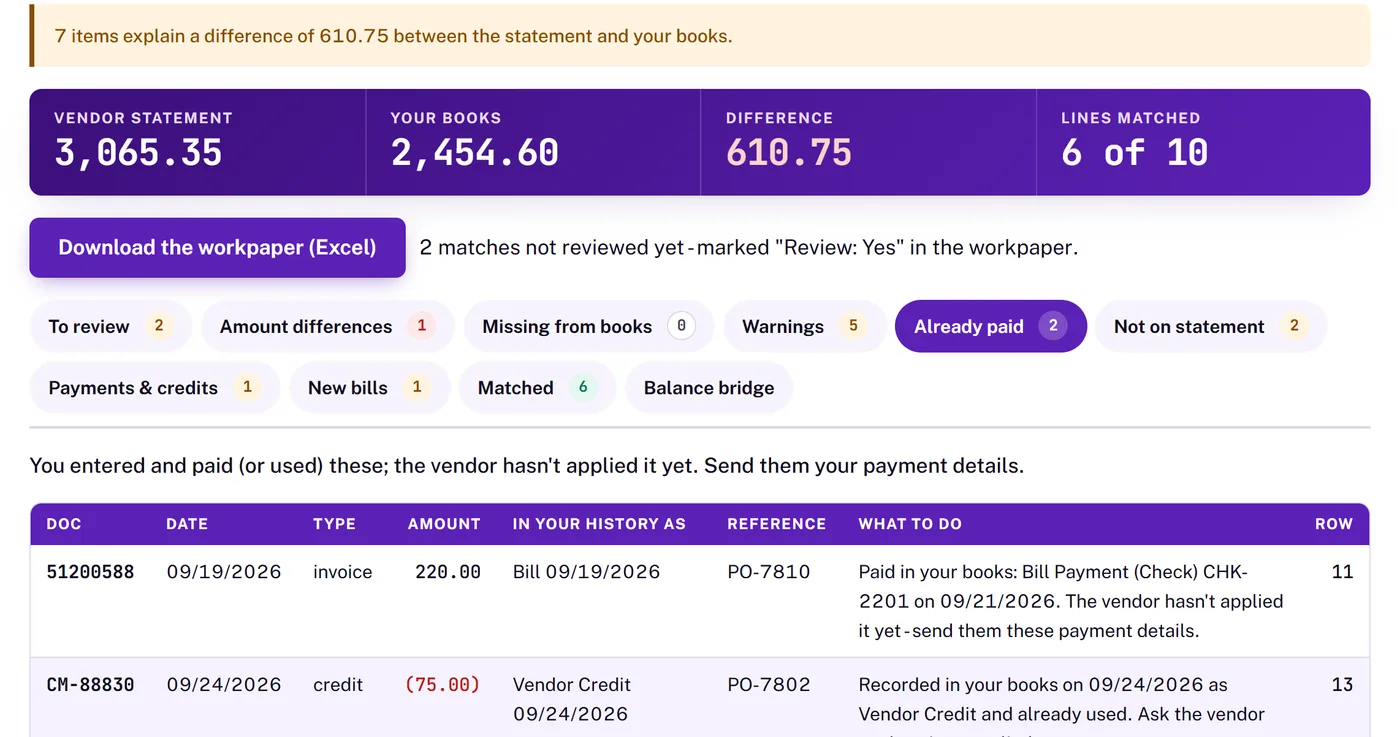
It's free while in beta, and your files never leave your browser.